How to Sit Comfortably All Day: Office Chair and Desk Ergonomics
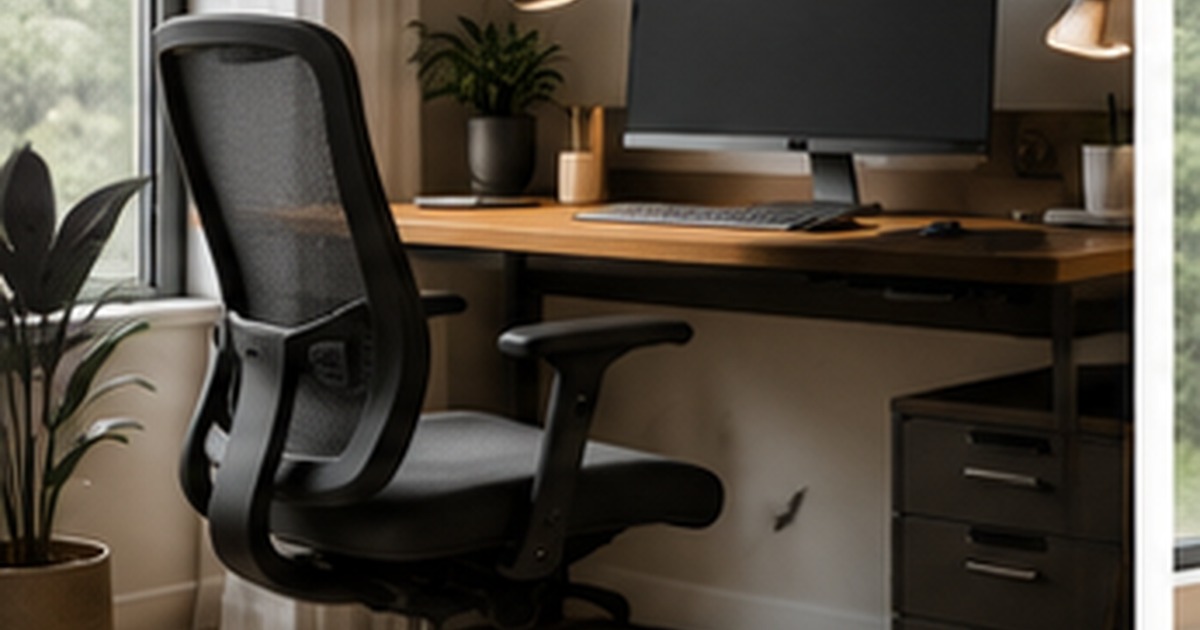
If you ache by mid-afternoon, the problem is rarely that you need a more expensive chair, it is usually that your setup is working against your body. Good ergonomics is mostly about how things are arranged and adjusted, not how much you spent, and the single biggest improvement most people can make costs nothing at all. That said, the chair does matter, and knowing what genuinely helps versus what is marketing lets you spend wisely if you do upgrade. Here is how to sit comfortably through a full working day, starting with what you already have.
Set up what you have before you spend
Before buying anything, get your current setup right, because a well-adjusted basic chair beats a premium chair set up badly. The goal is a neutral posture: feet flat on the floor, knees roughly level with or just below the hips, and your back supported in its natural curve. Adjust your seat height so your forearms are roughly parallel to the floor when typing, with your shoulders relaxed rather than hunched. If your feet dangle, a simple footrest, even a stack of books, fixes it instantly.
Your screen position matters just as much as the chair. The top of the monitor should sit around eye level so you look slightly down at the screen, not up or far down, which strains the neck. If you work on a laptop, this is almost impossible without help, so a laptop stand plus a separate keyboard is one of the cheapest, highest-impact ergonomic upgrades there is, and it is doubly useful in a tight workspace, as our guide to a small home office setup explains.
What actually matters in a chair
When you do look at chairs, a handful of features do the real work, and a lot of expensive extras do not. Focus on adjustability and support rather than gimmicks.
- Seat height adjustment: essential, so your feet rest flat and your arms reach the desk comfortably.
- Lower-back (lumbar) support: the feature that most protects your back over long sittings; adjustable is best.
- Seat depth and a waterfall front edge: so the seat supports your thighs without pressing behind the knees.
- Adjustable armrests: to keep shoulders relaxed and take load off the neck and upper back.
- A recline or tilt: because the best posture is a changing one, leaning back periodically relieves the spine.
Notice what is not on that list: headrests, aggressive “gaming” bolsters, and flashy materials are mostly preference, not ergonomics. A mid-priced chair with genuine lumbar support and the adjustments above will serve most people better than a pricier chair without them.
The desk and the rest of the setup
A chair works as part of a system. Your desk should let your forearms rest parallel to the floor; if it is too high and not adjustable, raising the chair and adding a footrest is the workaround. Keep your keyboard and mouse close so you are not reaching, which strains the shoulders, and position your screen an arm’s length away. If you are kitting out a workspace from scratch, it is worth getting the desk height and depth right early, as covered in our home office and standing desk guides.
Movement beats the perfect chair
Here is the truth the industry underplays: no chair, however good, is healthy to sit in motionless for eight hours. The body is built to move, and the most important ergonomic habit is changing position regularly, standing, stretching, and walking for a minute or two every half hour or so. A perfectly set-up chair you never leave is still hard on your back; a decent chair plus regular movement is far better. Build small breaks into your day, and consider alternating sitting with standing if your setup allows.
When it is worth investing
If you spend long hours at a desk most days, a good chair is a genuinely worthwhile investment in comfort and long-term wellbeing, and the cost per year of daily use is small, as it is for a heavily used gaming setup, where long sessions make comfort essential. Prioritise adjustability and lumbar support, try before you buy if you can, and ignore the features that photograph well but do nothing for your back. But fix your setup and your habits first; many people discover that a free hour of adjusting their existing chair, screen, and routine solves the ache they were about to spend a fortune to fix.
Common ergonomic mistakes
Most desk discomfort traces back to a short list of avoidable mistakes, and spotting them is often quicker than any upgrade.
- Working on a laptop at desk height for hours, which forces a hunched neck; raise the screen and add a separate keyboard.
- A screen set too low or off to one side, so you twist or crane to see it through the day.
- A chair so low that your knees sit above your hips, or so high that your feet dangle.
- Reaching for a keyboard and mouse placed too far away, which loads the shoulders and upper back.
- Sitting perfectly still for hours, even in a great chair, instead of moving regularly.
Run through that list before you blame your furniture. Fixing even two or three of these usually relieves the ache people assume requires a new chair, and it costs nothing but a few minutes of rearranging.
Frequently asked questions
How should I set up my office chair?
Adjust the seat height so your feet rest flat and your forearms are roughly parallel to the floor when typing, with shoulders relaxed. Use the lumbar support to back your natural lower-spine curve, set the seat depth so it supports your thighs without pressing behind the knees, and position your screen so its top is around eye level. If your feet dangle, add a footrest.
Do I really need an expensive ergonomic chair?
Not necessarily. A well-adjusted mid-priced chair with genuine lumbar support and height, depth, and armrest adjustment serves most people better than a pricey chair without those features. Fix your setup and add regular movement first, since posture and habits matter more than price. Invest in a better chair if you sit for long hours daily and your current one lacks the key adjustments.
What is the most important ergonomic habit?
Moving regularly. No chair is healthy to sit in motionless all day, so the single best habit is changing position often, standing, stretching, or walking for a minute or two every half hour. A decent chair combined with regular movement beats the most expensive chair used without breaks. Build small movement breaks into your routine.
Can a footrest really help my posture?
Yes, especially if your desk or chair runs a little high. If your feet dangle or you tuck them under the chair, a footrest lets them rest flat and keeps your knees at a comfortable angle, which takes pressure off your lower back and thighs. It is a cheap fix for one of the most common setup problems, and even a sturdy box or stack of books works in a pinch.

Written by Ankita Roy
Furniture buying editor focused on practical room planning, material checks, and clear decision guidance.
Related furniture guides
Standing Desks: What They Help, What They Don’t, and How to Use One
A level-headed look at standing desks: the real benefits, the overblown claims, how to alternate sitting and standing, and what to check…
How to Set Up a Home Office in a Small Space
No spare room? How to build a comfortable, productive home office in a corner, closet, or shared room, with realistic choices for…

How to Build a Comfortable Gaming Setup That Lasts
Beyond the RGB: how to build a gaming setup that is actually comfortable for long sessions, covering desk, chair, posture, screen height,…