How to Build a Comfortable Gaming Setup That Lasts
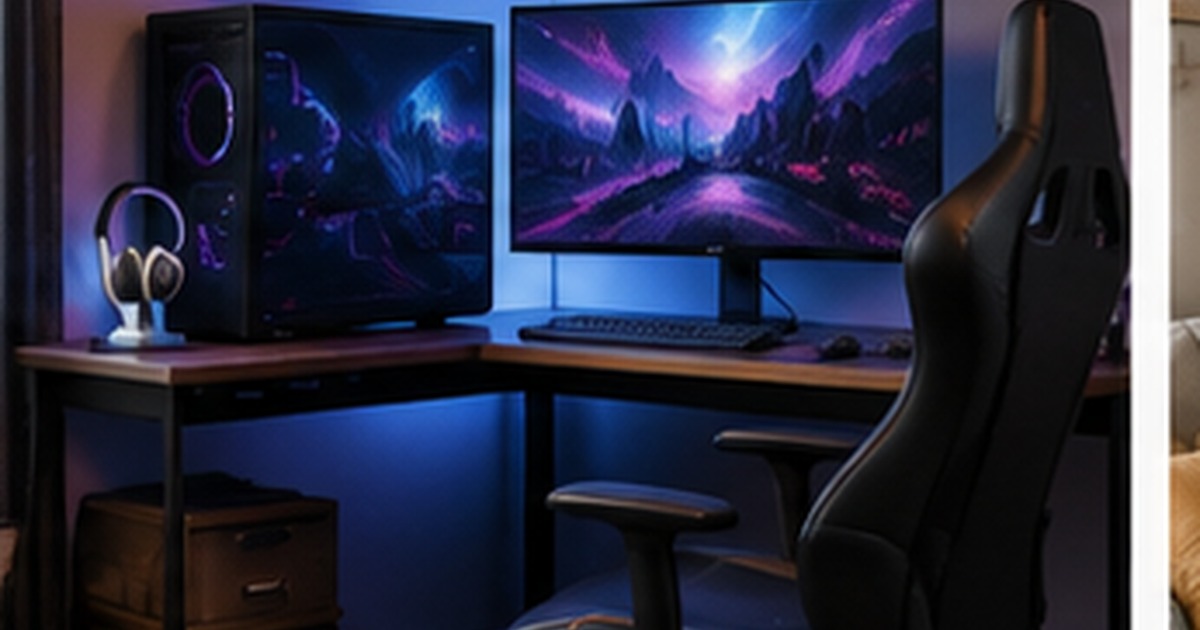
It is easy to spend a fortune on a gaming setup and still end up aching after a long session, because the things that get the attention, lights, a flashy chair, the biggest screen, are not the things that make you comfortable. A genuinely good setup is built around your body and how you sit for hours, with the aesthetics layered on top. Done right, it keeps you comfortable through marathon sessions and protects your back, neck, and wrists over the years. Here is how to build a gaming space that lasts, starting with the parts that actually matter.
Comfort first, lights later
The unglamorous truth is that ergonomics matters more for gamers than for almost anyone, because gaming sessions are long and intensely focused, exactly when bad posture does its damage. The same principles that make an office setup healthy apply here, just for longer stretches, so it is worth reading our guide to chair and desk ergonomics alongside this. Get the body right first, then spend on the looks; a stunning RGB setup that wrecks your neck is a bad setup.
The desk: surface and depth
A gaming desk needs to do two things well: give you enough surface for your screen, keyboard, and mouse with room to move, and sit at the right height. Depth is the detail people overlook, you want the monitor far enough back to sit roughly an arm’s length away, so a shallow desk forces the screen uncomfortably close. A wide surface lets you keep a low mouse sensitivity with room for big sweeps, which competitive players value. If you want the option to stand during long sessions, a sit-stand desk works for gaming too, with the caveats in our guide to standing desks.
The chair and your posture
A gaming chair is not automatically an ergonomic chair, the bucket-seat shape and bolsters are styling as much as support. What matters is the same as any office chair: seat-height adjustment so your feet rest flat and forearms sit level, genuine lower-back support, and adjustable armrests to relax the shoulders. The recline is useful, since leaning back periodically rests the spine during long sessions. Whether it has go-faster stripes is up to you, but do not assume the racing look means better support; judge it on the adjustments and lumbar support, not the styling.
Screen height and distance
Screen position is where a lot of gaming neck and eye strain comes from. The top of the monitor should sit around eye level so you look slightly down, not up at a screen perched too high or down at a laptop. For multiple monitors, place your primary screen directly in front of you, not off to the side, so you are not turning your neck for hours. Sit roughly an arm’s length from the screen, and if you use a large or ultrawide monitor, a little more distance keeps the whole display comfortable to take in.
Cable management and the finishing touches
A pile of cables is both an eyesore and a dust trap, and gaming setups have a lot of them, so taming them is worth the effort. Gather cables with clips or a sleeve, use a cable tray under the desk, and a single power strip to keep the chargers and plugs in one place; the same approach works for a media wall. With the comfort and cables sorted, then add the personality, lighting, a headset stand, a mouse pad that fits the desk, because those finishing touches feel much better on a setup that already treats your body well. Comfort first, flair second, and the setup stays good for years.
Accessories that actually help comfort
A few inexpensive accessories do more for long-session comfort than most big-ticket upgrades. A wrist rest for the keyboard and a supportive mouse pad ease the strain on wrists during long sessions, and a monitor arm frees desk space while letting you set the exact screen height and distance, which a fixed stand cannot. A footrest helps if your chair runs a touch high, and a headset stand keeps the desk clear.
Spend here before you spend on spectacle. The order that keeps a setup comfortable for years is simple: get the desk height and depth right, get a genuinely supportive chair, position the screen properly, tame the cables, add the comfort accessories, and only then layer on the lighting and personality. A setup built in that order feels good at hour one and at hour six, which is the whole point of a space you spend so long in.
Frequently asked questions
Are gaming chairs actually good for your back?
Not automatically. The racing-style shape and bolsters are largely aesthetic; what protects your back is the same as any office chair, height adjustment, genuine lumbar support, adjustable armrests, and a recline. Some gaming chairs have these and some do not, so judge a chair on its adjustments and support rather than its sporty looks.
How high should my gaming monitor be?
Position the monitor so its top is around eye level, letting you look slightly down at the screen rather than up or far down. For multiple monitors, put your primary one directly in front of you to avoid turning your neck for hours. Sit about an arm’s length away, and allow a little more distance for large or ultrawide screens.
What matters most in a gaming desk?
Enough surface for your screen, keyboard, and mouse with room to move, and the right height and depth so your forearms sit level and the monitor is about an arm’s length away. Depth is commonly overlooked, a shallow desk forces the screen too close. Stability matters too, especially if you opt for a sit-stand desk. Looks come after these basics.
How do I make a gaming setup comfortable for long sessions?
Build it around your body: a desk at the right height and depth, a chair with real lower-back support and adjustable height and armrests, and the monitor top at eye level about an arm’s length away. Tame the cables, add a wrist rest and supportive mouse pad, and take regular breaks to move. Comfort comes from these fundamentals, not from lighting or styling.
Do I need a special gaming desk, or will a normal desk do?
A normal desk works fine as long as it gives enough surface for your screen, keyboard, and mouse, sits at the right height, and has enough depth to place the monitor about an arm’s length away. Dedicated gaming desks add width, cable routing, and styling, which some players value, but a sturdy, well-sized ordinary desk meets the same ergonomic needs for less.

Written by Adarsh Sharma
Furniture buying editor focused on practical room planning, material checks, and clear decision guidance.
Related furniture guides
How to Sit Comfortably All Day: Office Chair and Desk Ergonomics
Back ache by 3pm? A practical guide to office ergonomics: how to set up your chair, desk, and screen, and what matters…
Standing Desks: What They Help, What They Don’t, and How to Use One
A level-headed look at standing desks: the real benefits, the overblown claims, how to alternate sitting and standing, and what to check…
How to Set Up a Home Office in a Small Space
No spare room? How to build a comfortable, productive home office in a corner, closet, or shared room, with realistic choices for…